Write better prompts
Describe how the business actually runs so the generated flow is closer to production from the first pass.
Use this guide to improve the quality of the initial AI-generated flow before you spend time editing.
Browse templatesWhat to include in the prompt
- Business type and customer goal: booking, lead capture, intake, ordering, quoting, support, or follow-up.
- Concrete rules: minimum notice, availability windows, pricing, seat or inventory limits, approval requirements, or unsupported requests.
- Required customer answers: phone number, email, party size, preferred date, budget range, order details, or other critical fields.
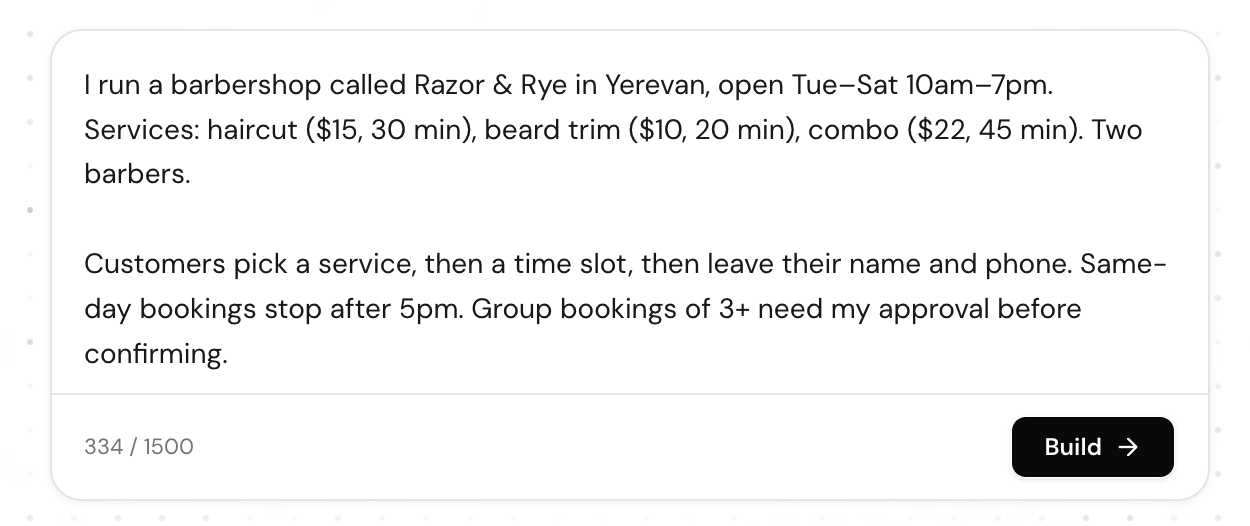
Strong prompt patterns
Be operational, not promotional
A useful prompt reads like internal process notes, not homepage copy. Replace vague claims with rules the bot can act on.
Include exceptions early
If weekends are closed, large groups need approval, or same-day bookings stop after a certain hour, put that in the first prompt instead of patching it later.
Match the working language
The generator follows the language of the prompt, so you can describe the business in the same language your customers use.
Quick prompting checklist
- If a human operator would ask a question every time, include it explicitly in the prompt.
- If a field should be validated, mention the format clearly so you can add or confirm the right validation later.
- If the owner must approve the result, say so up front so the draft pipeline and notifications start in the right direction.
A practical rule
If your prompt could be handed to a new staff member on their first day, it is usually detailed enough for a good first bot draft.
Related guides
Continue with the next part of the setup once this step is stable.
Create your first bot
Start from a plain-language description or a template, generate a first draft, and understand what guests can do before signing up.
Edit and refine your flow
Use AI-assisted edits for broad changes, then switch to manual flow editing when you need precise control.
Add validations and review rules
Make the bot stricter where format matters and define how submissions move through review, updates, and follow-up.